Skip to content
Tradie Forms
Features
Pricing
  • Electrical in NSW
  • Electrical in VIC
  • Electrical in QLD
  • Electrical in WA
  • Electrical in SA
  • Electrical in TAS
  • Electrical in ACT
  • Electrical in NT
  • Plumbing in NSW
  • Plumbing in QLD
  • Plumbing in SA
  • Plumbing in TAS
  • Gasfitting in TAS
  • Gasfitting in NT
  • Building in NSW
  • Building in VIC
  • Building in QLD
  • Fire Safety in NSW
  • Fire Safety in QLD
  • Pest Control in VIC
  • Pest Control in WA
  • ACMA TCA1
  • NSW Fire Safety Statement
  • NSW Combined Notice
  • QLD CoTC
  • QLD Form 9
  • Browse all forms
  • AI assistant
  • PDF tools
  • Integrations
  • Guides
  • Documentation
Log inCreate form
Form title and outcome
Form subtitle and product promise
Start form
Start form
Free PDF downloads
Free PDF downloads
Form title and outcome
Form subtitle and product promise
Start form
Start form
Free PDF downloads
Free PDF downloads
Label
Detail
Label
Detail
Label
Detail
Label
Detail
Label
Detail
Label
Detail
Label
Detail
Label
Detail
Finished output
Finished output
Bullet
Bullet
Bullet
Start form
Start form
Finished output
Finished output
Bullet
Bullet
Bullet
Start form
Start form
Tradie Forms

Fill Australian trade forms on your phone at the job, with gaps flagged before you download clean PDFs on the official layout. Built for sparkies, plumbers, builders, and crews.

Theme

Product

  • Features
  • Pricing
  • AI assistant
  • PDF tools
  • Integrations
  • Custom forms

Trades

  • Electrical
  • Plumbing
  • Gasfitting
  • Building
  • Fire Safety
  • Pest Control

Explore

  • Forms
  • Guides
  • Documentation
  • About
  • Contact

Account

  • Log in
  • Create free account

Legal

  • Terms of service
  • Privacy policy

© 2026 Tradie Forms Australia. All rights reserved.

Your Permit to Work done in minutes

Set the task and validity window, confirm the controls, capture both authorisation signatures, and reopen the draft when the work is finished.

One permit records who issued the work, who accepted it, and how it ended.

Create Permit to WorkDownload 3 PDFs free each monthPreview the PDF before you download
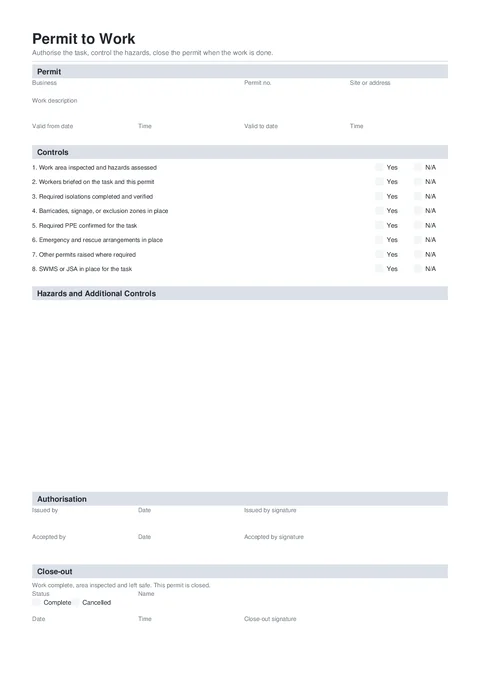
Permit to Work form preview
Preview of the Permit to Work PDF download.
Free to complete
3 finished PDFs a month on the free plan.No account needed to begin.
Template source
Created by Tradie Forms.
Template version
2026.1Current
Check the details
Read the form guide

Is this the right Permit to Work?

A permit to work is a site control record for a defined task, area, and validity period. This Tradie Forms template records the permit lifecycle. It is not a government form.

  • This is a Tradie Forms designed record, not a government-issued permit.
  • Use a specialised hot works or confined space permit when the task needs those controls.
Who has to complete the Permit to Work?
The person authorised to issue the work completes the permit with the worker or supervisor accepting the task.
When is it required?
Use it when your business, client, principal contractor, or site procedure requires formal authorisation before a controlled task starts.
Where does the completed form go?
Give the accepted permit to the worker or supervisor and keep the issued and closed copies with the job records.
Can I fill it on my phone?
Yes. Tradie Forms walks you through each section on your phone and downloads the official PDF layout when you are ready.
Will this PDF be accepted?
Tradie Forms downloads your answers in the official PDF layout where supported. Always preview and check the completed PDF before sending, lodging, or handing it over. Tradie Forms does not lodge or certify the form for you.